Resume for Apple: How to Tailor It
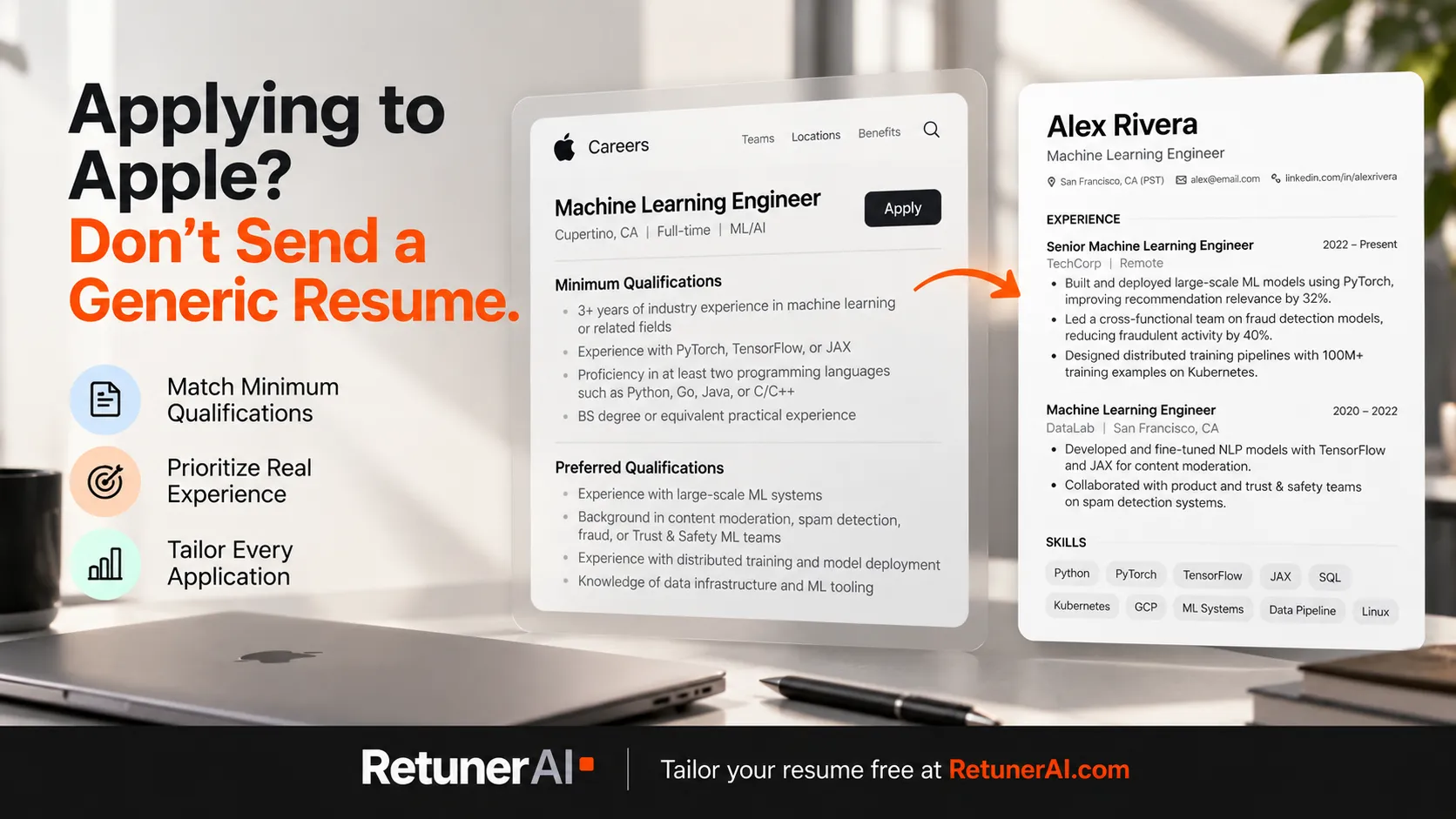
Applying to Apple means applying to one specific role, with its own posting, its own qualifications and its own team. The useful question isn’t “what does Apple want on a resume?” but “what does this posting ask for, and where does my resume show it?”
Quick answer: To tailor a resume for Apple, work from the exact job posting on jobs.apple.com. Apple postings typically separate Minimum Qualifications from Preferred Qualifications, so make every minimum requirement you genuinely meet easy to find, back up preferred qualifications only with real evidence, use the posting’s own terms for skills you have, and cut what doesn’t support the role. Submit a clean PDF, Word, Pages, RTF or TXT file under 2 MB. If you’re applying to several Apple roles, or to Apple alongside other companies, RetunerAI turns your resume and each job description into a complete tailored resume in about 10 seconds, which you review and edit before downloading, and its unlimited 7-day free trial lets you try that across multiple real applications.
A note before the details: RetunerAI isn’t affiliated with Apple, and nothing here is insider knowledge of how Apple screens candidates. Everything about Apple below comes from Apple’s own careers site and live job postings, checked in October 2026.
What an Apple job posting gives you to work with
Apple’s job postings on jobs.apple.com are usually split into four parts: a Summary of the team and role, a Description of the work, Minimum Qualifications and Preferred Qualifications. Each posting also has a Role Number. Those last two sections are the most useful input you have for tailoring, because they tell you which requirements are baseline and which are a bonus.
Two live postings show how different they can be.
A Sr. Machine Learning Engineer posting lists minimum qualifications such as “3+ years of industry related experience, working in collaborative environments,” experience “utilizing PyTorch, TensorFlow, or JAX for training and deploying deep learning models,” and proficiency in “at least two programing languages such as: Python, Go, Java, C/C++.” Its preferred qualifications go narrower: “content moderation, spam detection, fraud, or Trust & Safety ML teams” and “red-teaming, adversarial training, or robustness evaluation of ML models.”
A US Specialist posting for Apple Retail has a very different shape. Its minimum qualification is availability to work “a schedule based on business needs that may include nights, weekends, and public holidays.” Its preferred qualifications include being able to “Personalize solutions based on customer needs, and effectively communicate them” and to “Work in a fast-paced environment, often supporting multiple customers at the same time.”
Same company, nearly nothing in common. That’s why “a resume for Apple” really means a resume for one Apple role.
How to tailor your resume to an Apple posting
1. Map the Minimum Qualifications first
Go through the Minimum Qualifications line by line and find where your resume proves each one. If the posting asks for three or more years of industry experience in collaborative environments, your dates and bullets should make that obvious without the reader doing math. If it names specific frameworks, the ones you’ve actually used should appear by name, in a bullet that shows what you built with them, not only in a skills list.
If a minimum qualification is something you meet but your resume doesn’t show, that’s the first fix. If it’s something you don’t meet, don’t paper over it with vague wording. Decide whether to apply anyway, but keep the resume truthful.
2. Back up Preferred Qualifications with evidence, not claims
Preferred Qualifications are where specific experience can stand out. For the machine learning role above, someone who has worked on fraud detection should name that work plainly: what the system did, what they built, what changed. For example, a bullet like “Built a classifier to flag fraudulent transactions, reducing manual review volume” (with your real numbers) does more than adding “fraud” to a skills section.
If you don’t have a preferred qualification, leave it out. It’s preferred, not required.
3. Use the posting’s own words for skills you actually have
When the posting says “PyTorch” and your resume says “deep learning frameworks,” make it specific. When a retail posting talks about personalizing solutions for customers, describe your customer-facing work in those concrete terms. Matching the vocabulary of the posting makes your relevant experience easier for any reader to spot. It isn’t a license to add terms for skills you don’t have.
4. Reorder and rewrite the summary for the role
Your summary and the first bullet under each job are what a reader sees first. Rewrite the summary for the specific posting: the role type, your most relevant experience, and one or two qualifications from the posting that you clearly meet. Then reorder bullets so the ones that match this role come first.
5. Cut what doesn’t support this role
Content that helped for a previous application may just be noise for this one. A retail Specialist resume doesn’t need a list of internal tools from an unrelated back-office job. A machine learning resume doesn’t need every course you’ve taken. Shorter and more relevant is usually easier to read than complete.
For a deeper walkthrough of the tailoring process itself, this guide to tailoring a resume covers it step by step.
Retail vs. corporate Apple roles
Apple Retail roles and corporate roles ask for different kinds of evidence, so the same resume rarely serves both.
For Apple Retail roles like Specialist, the posting language above centers on customer interaction, learning products, teamwork and schedule availability. Strong bullets describe how you helped customers, handled busy periods, explained products or services, and worked with a team. If your availability matches what the posting describes, it’s reasonable to make that clear.
For corporate roles, the engineering postings checked for this article list specific skills, tools, years of experience, and education or equivalent work experience. Bullets should name the tools and show the scope and outcome of the work.
Submitting your resume on jobs.apple.com
A few practical details from Apple’s own jobs site, current as of October 2026:
- Formats: Apple’s site says, “Share your resume in any of the following formats: PDF, Microsoft Word, Pages, RTF, or TXT.”
- File size: “The maximum file size is 2 MB.”
- Options: you can attach a file, paste your resume as text, or use your LinkedIn profile. You can also fill in your profile manually.
- Profile import: after you upload, the site processes your resume into your Apple profile and asks you to “review, edit, and confirm the details.” Check that import carefully. A simple, cleanly structured resume makes that review faster, and anything that didn’t come through correctly is yours to fix before submitting.
- Locations: when you apply to a role listed in several places, Apple’s site says you “will be considered for all locations where it’s available.”
- Why Apple asks for it: the resume prompt itself says your resume “will help us understand which teams most closely match your skills and interests.”
Apple’s site doesn’t publish how resumes are evaluated after that, and this article won’t guess. What you control is the document: clear, accurate and tailored to the posting. For general formatting guidance, this ATS-friendly resume guide covers the basics.
What to leave out
- Apple marketing language. Phrases borrowed from Apple’s product pages or careers site don’t tell a reader anything about you.
- Values name-dropping. The Apple Values section on Apple’s site lists areas such as Accessibility, Privacy and Environment. If you’ve done real work in one of those areas that’s relevant to the role, describe the work. Don’t just name the value.
- Unsupported skills. Don’t list a framework or a qualification you can’t talk about in an interview.
- A generic “one resume for all of Apple.” As the two postings above show, Apple roles differ too much for that.
Tailoring for more than one Apple role
Tailoring one resume to one posting by hand is manageable. The work adds up when you’re applying to several Apple roles, or to Apple alongside other companies, and each posting needs its own summary, bullet order and skills emphasis.
That repeated work is what RetunerAI is built for. Upload your existing resume, paste the Apple job description, choose one of three ATS-friendly templates, and RetunerAI generates a complete tailored resume in about 10 seconds. It’s designed to produce natural, professional, job-specific writing based on your actual experience rather than blind keyword stuffing, and if a skill isn’t supported by your background, RetunerAI shouldn’t invent it. You review the result, edit anything you want, and download it. Then paste the next job description and do the same for the next role.
If the role calls for a cover letter, RetunerAI’s Cover Letter Generator uses the same resume and job description to produce a matching cover letter in about 10 seconds, which you also review and edit before downloading. There’s more on that in this guide to writing cover letters with AI.
RetunerAI includes an unlimited 7-day free trial, so you can tailor resumes for multiple real applications, Apple roles and others, and decide whether to continue with a paid subscription after you’ve actually used it. RetunerAI can’t control who gets hired, but it can make producing a strong, job-specific resume for each application much faster than rewriting it by hand.
If you’ve been applying and not hearing back, this diagnostic covers the most common resume-side reasons.
FAQ
How do I tailor my resume for an Apple job? Start from the specific Apple posting, not from Apple in general. Apple postings typically list a Summary, a Description, Minimum Qualifications and Preferred Qualifications. Make sure every minimum qualification you genuinely meet is easy to find on your resume, show preferred qualifications only where you have real evidence, use the posting’s own terms for skills you actually have, and cut content that doesn’t support that role.
What resume file formats does Apple accept? As of October 2026, Apple’s jobs site (jobs.apple.com) accepts resumes in PDF, Microsoft Word, Pages, RTF or TXT format, with a maximum file size of 2 MB. You can also paste your resume as text or use your LinkedIn profile.
Should I use the same resume for every Apple role I apply to? Usually not. Apple postings differ in their minimum and preferred qualifications from role to role, so a resume that fits one role can bury the experience another role asks for. Adjust the summary, the order of your bullets and your skills list for each posting.
Do I need to mention Apple’s values on my resume? Only when you have real work that relates to them. A resume isn’t the place for Apple marketing language. If you’ve done accessibility, privacy or customer-facing work that matches the posting, describe that work concretely in a bullet instead of naming a value.
What does RetunerAI do? RetunerAI is an AI resume-tailoring tool. You upload your existing resume and paste the job description, and RetunerAI generates a complete tailored resume in about 10 seconds, based on your actual experience. You review and edit it before downloading in one of three ATS-friendly templates. RetunerAI includes an unlimited 7-day free trial, so you can tailor resumes for multiple real applications before deciding whether to continue with a paid subscription. RetunerAI is not affiliated with Apple.
Ready to tailor your resume for a real job?
Turn your base resume into a job-specific ATS-ready version in about 10 seconds.
- · Match your resume to the actual job description
- · Generate a polished ATS-ready PDF
- · Review and edit before you apply
Tailor my resume free
"I finally got an offer after using it." — from a user email
More Career Resources
Does Google Have an ATS Score? What People Actually Mean
Google doesn't publish an ATS score for applicants. Here's what Google actually documents, what a "Google ATS score" usually refers to, and what to focus on instead.
How to Get Hired at Google: What Actually Helps
What Google's own careers site tells candidates about resumes, choosing roles, assessments and interviews, and how to tailor your resume to each Google posting.
Best AI Resume Prompts (ChatGPT, Claude, Gemini)
Copy-ready AI resume prompts that work in ChatGPT, Claude, and Gemini: job description analysis, tailoring, bullet rewrites, and a fact-check pass, plus where a dedicated tool fits in.